> ## Documentation Index
> Fetch the complete documentation index at: https://docs.squadvault.xyz/llms.txt
> Use this file to discover all available pages before exploring further.
# Billing
> Understand plans, feature gates, and how to upgrade your organization.
Billing is managed per organization. Owners and admins can change plans and payment methods.
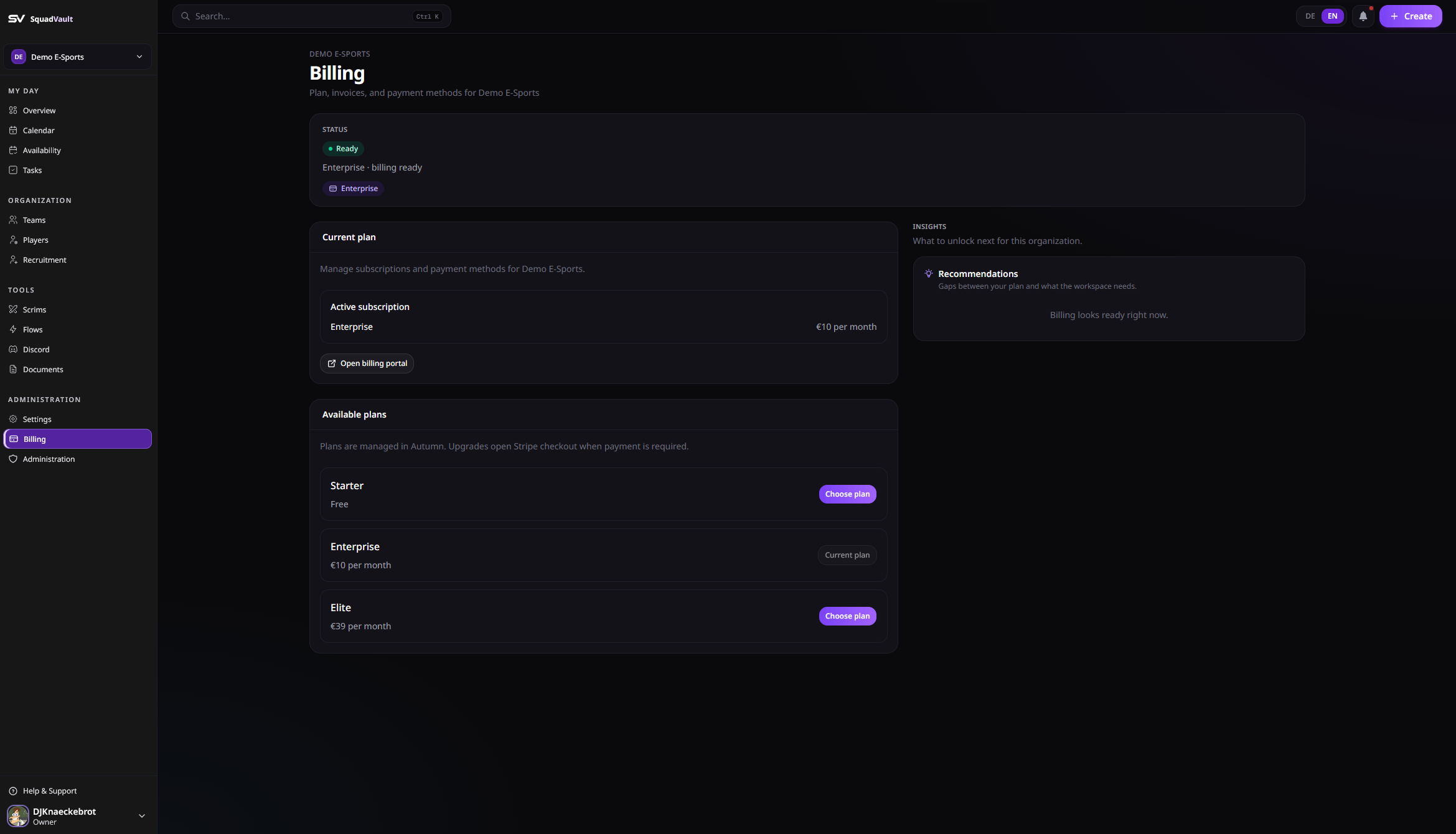
The page shows **subscription status**, then **work** (portal + choose plan), then **insights** (no plan / locked features).
 ## Open billing
1. Go to **Billing** in the sidebar (owners and admins).
2. Review your current plan and available plans.
3. Choose a plan to start checkout when payment is required, or open the billing portal to manage payment methods.
## Feature access
Some features require a plan upgrade, including:
* Team and player management capacity
* Tryout / recruitment tools (basic recruiting)
* Form Builder / enhanced recruiting
* Custom apply domain (Elite)
* Feedback surveys
* Custom survey branding (public cover image)
* Scrim management (Mission Control)
* Discord Sync
* Flows (automations)
* Documents
* Organization API keys
* Audit log
* Member management extras
When a feature is locked, the dashboard shows an upgrade banner. Upgrade from billing, then retry the action.
## Plan changes and limits
Changing plans never deletes roster, files, team lists, or recruiting forms.
If you move to a smaller plan while you still have extra **open application forms** or **Team Panels**, they stay. You cannot add more until you close extras or upgrade. Billing shows this as over the plan limit.
Failed payments and canceled subscriptions keep the same rule: data stays; paid features lock until the invoice is paid or you choose a plan again. Open the **billing portal** to update the card, download invoices, or cancel.
Owners and admins confirm every plan change. The confirmation states that existing data is kept.
## Tips
* Only owners and admins can change plans.
* After upgrading, wait a moment if access does not refresh immediately, then reload (or open **Billing** to refresh feature access).
* Contact [hello@squadvault.xyz](mailto:hello@squadvault.xyz) for custom pricing questions.
* Custom apply domains need DNS (CNAME + TXT) and edge TLS (see [Recruitment](/user-guide/recruitment)).
## Open billing
1. Go to **Billing** in the sidebar (owners and admins).
2. Review your current plan and available plans.
3. Choose a plan to start checkout when payment is required, or open the billing portal to manage payment methods.
## Feature access
Some features require a plan upgrade, including:
* Team and player management capacity
* Tryout / recruitment tools (basic recruiting)
* Form Builder / enhanced recruiting
* Custom apply domain (Elite)
* Feedback surveys
* Custom survey branding (public cover image)
* Scrim management (Mission Control)
* Discord Sync
* Flows (automations)
* Documents
* Organization API keys
* Audit log
* Member management extras
When a feature is locked, the dashboard shows an upgrade banner. Upgrade from billing, then retry the action.
## Plan changes and limits
Changing plans never deletes roster, files, team lists, or recruiting forms.
If you move to a smaller plan while you still have extra **open application forms** or **Team Panels**, they stay. You cannot add more until you close extras or upgrade. Billing shows this as over the plan limit.
Failed payments and canceled subscriptions keep the same rule: data stays; paid features lock until the invoice is paid or you choose a plan again. Open the **billing portal** to update the card, download invoices, or cancel.
Owners and admins confirm every plan change. The confirmation states that existing data is kept.
## Tips
* Only owners and admins can change plans.
* After upgrading, wait a moment if access does not refresh immediately, then reload (or open **Billing** to refresh feature access).
* Contact [hello@squadvault.xyz](mailto:hello@squadvault.xyz) for custom pricing questions.
* Custom apply domains need DNS (CNAME + TXT) and edge TLS (see [Recruitment](/user-guide/recruitment)).